Your journal, now with AI.
Log trades in plain words or from a screenshot, ask your journal anything, get a weekly review of your process and a market report after every U.S. release. You check every draft before it’s saved.

Less typing. More reviewing.
Sweep AI appears only when you tap an AI action, marked ✦ in the app. It works in English, French and Spanish.
Log in plain words
“2 NQ longs at the London open, first stopped at −12 ticks, second +30 at target” becomes draft trades you check and save.
Import a screenshot
A fills or trade-history screenshot becomes draft trades, ready to check.
Ask your journal
“Win rate on NQ after 10:30?” The AI understands the question; Sweep calculates the number from your own trades.
Weekly review
A process score out of 10, what went well, what to fix, one focus and one rule for next week.
Day debrief
Plan against execution for a journaled day: verdict, checks, lesson and one action for tomorrow.
Trade feedback
What went well, what to improve and what to do next time. It can read the trade’s chart screenshot.
Setup suggestion
Suggests the setup and tags from your own list, applied in one tap.
Scan a receipt
Evaluation invoices, reset fees, data fees and payout emails become expenses or payouts to check and save.
Describe the trade. Sweep fills the ticket.
Type it like a message or import a screenshot of your fills. Sweep turns it into draft trades with account, instrument, size, prices and times. Nothing is saved until you check it.
- “✦ Log with AI” right in the trade ticket
- Several trades from one sentence
- Fills and trade-history screenshots

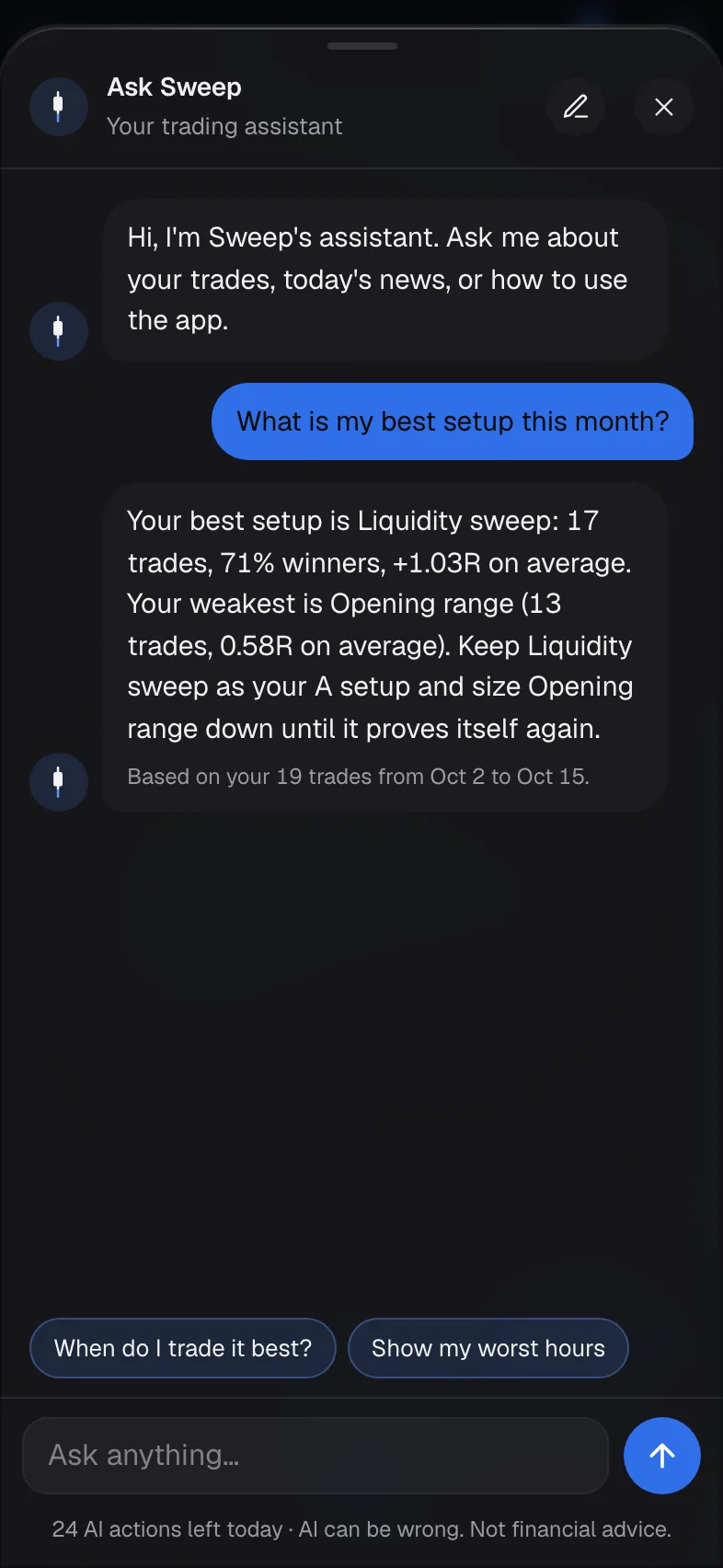
Ask Sweep anything about your trading.
Ask Sweep, your trading assistant, lives in the corner of the app. Ask about your results, today’s U.S. news or how to use Sweep. It suggests follow-up questions and can open the right page in one tap.
- “How did I do this week?” “How do I do after a loss?”
- Numbers calculated by Sweep from your journal
- No predictions, no signals, and it says so kindly

A coach’s read on your week, in seconds.
The weekly review scores your process out of 10 and ends with one focus and one rule for next week. The day debrief compares your plan with what you did. A Discord-ready recap can be copied in one tap.

Feedback on every trade, if you want it.
From the trade review, get what went well, what to improve and what to do next time. Sweep AI can read your chart screenshot and suggest the setup and tags from your own list.

Every U.S. release, recapped in a minute.
Numbers fill themselves in from official sources, with a flash recap about a minute after the release and a full market reaction report after about 30 minutes.


AI that helps you review, never trade for you.
Drafts you check
Nothing the AI writes is saved until you check it.
Math by Sweep
Stats come from your journal, calculated by Sweep, not guessed.
Sources shown
Every market report lists its sources and a confidence level.
No signals
No predictions, no entries or exits, no financial advice.
Sweep AI questions
What is Ask Sweep?
The chat assistant in the corner of the app. Ask about your trades, today’s U.S. news or how to use Sweep. Numbers about your trading are calculated by Sweep from your journal.
How fast are economic numbers updated?
A flash recap about a minute after the release, a full market report after about 30 minutes, and a final update about 3 hours later. Updates run while traders use the app, so timing can occasionally be a little later.
Where do the economic numbers come from?
Official releases (BLS, BEA, Federal Reserve, ISM, Conference Board…) and major financial news, found with Google Search. Every report lists its sources, and a figure stays empty until it can be confirmed.
Is there a limit on AI?
Yes. AI actions are included with a daily limit per trader, shown in the app. Repeating the exact same request doesn’t count again.
Can Sweep AI tell me what to trade?
No. It only looks at your own past trades and public news. No signals, no predictions, no entries or exits.
What data does Sweep AI send, and when?
Nothing is sent until you tap an AI action. Then only what that action needs, for example your text, the screenshot you chose, or short summaries of your stats, goes to the AI provider. Settings → Sweep AI explains it in detail, and the Privacy policy lists the provider.
Start your record today.
Free during early access. Members who join now get VIP pricing at launch.
Sweep down. Jump up.